
PROBLEM:
Php comes along with Mysql in it. But we want to connect our WAMP with SQL Server
REASON:
- To add SQL Server with Wamp, some add-ons are required which is not avaiable by default on Wamp server.
SOLUTION:
To connect Wamp with SQL Server, we need 2 add-ons
- OBDC Driver
- SQLSRV Driver
1.OBDC Driver:
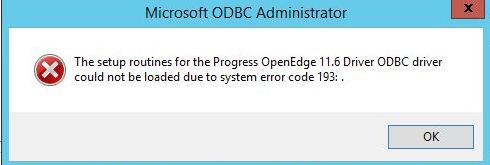
- OBDC Driver is required to show the errors in your program.
- Download the latest version of OBDC Driver that supports your version of wamp from below link.

- Install the OBDC driver in your computer.
2. SQLSRV Driver:
- The wamp will run but only orange lights flashes and says “Wamp server is running 2 out of 3 servers and it will stay orange.
SOLUTION:
- Some drivers are missing in your wamp which are mandatory to connect with SQL Server
- Go to Microsoft official website and download the SQLSRV Drivers
- On that package, select the SQLSRV drivers which are suitable for your version of PHP.
For Example, if you are downloading it for php version 7.0.10,
- php_sqlsrv_7_nts_x64.dll
- php_sqlsrv_7_ts_x64.dll
- Paste the two dll files in the following location
Localdisk C -> wamp64 -> bin -> php -> php7.0.10(your version) -> ext
- Then open the php.ini file.

- Search for extension and put the following lines below the extension lines
- extension=php_sqlsrv_7_nts_x64.dll
- extension=php_sqlsrv_7_ts_x64.dll
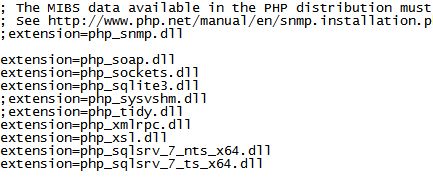
- Then allow the 2 dll files on the extensions by clicking on it

THAT’S IT…. Now you can do all programming with both Mysql and SQL SERVER.
Happy CODING!

 ADVANCED Php